The U.S. Federal Communications Commission (FCC) announced that it will not certify every new consumer router not made domestically in late March, essentially banning the import of every new commercial and residential router model into the U.S. The agency made this move in response to the increasing threat of supply chain attacks, which “pose an unacceptable risk to the national security of the United States or the security and safety of United States persons.” However, it also said that affected brands can apply for a “Conditional Approval” from the Department of War or the Department of Homeland Security, with Netgear being the first manufacturer to receive this coveted exemption.
According to the FCC’s covered list, the following Netgear models can be imported in the U.S. until October 1, 2027:
Nighthawk consumer mesh, mobile, and standalone routers (R, RAX, RAXE, RS, MK, MR, M, and MH series)
Orbi consumer mesh, mobile, and standalone routers (RBK, RBE, RBR, RBRE, LBR, LBK, and CBK series)
Cable gateways (CAX series)
Cable modems (CM series)
Some of these are included in our list of the best Wi-Fi routers and best budget routers. Another company, Adtran Inc., also received conditional approval for its Service Delivery Gateway class router.
Article continues below
It’s unclear how Netgear secured this exemption, especially as the DoW or DHS requires “a detailed, time-bound plan to establish or expand manufacturing in the United States for the router for which the applicant is seeking Conditional Approval in order for that device to qualify for FCC authorization” and “a description of committed and planned capital expenditures, financing, or other investments dedicated to U.S.-based manufacturing and assembly over the next 1-5 years, including expected timelines and milestones.”
The Verge notes that when a publicly traded company like Netgear plans a major investment, like constructing a new production line and supply chain, it’s usually required to disclose these plans to the U.S. Securities and Exchange Commission (SEC). However, the San Jose, California-based company, which produces routers in China, Vietnam, Taiwan, and Mexico, among other countries, did not mention anything about onshoring its manufacturing operations in its filings, raising questions about what its plans are and how it secured the exemption. Furthermore, the company said in its SEC disclosure that “So long as the conditional approval is maintained, NETGEAR can launch new consumer routers and update the software on existing consumer routers indefinitely.” The FCC cited a “specific determination” from the Pentagon that Netgear’s devices were not a risk to U.S. national security.
This does not mean that consumers should replace their existing routers with Netgear-branded ones immediately, especially as the FCC’s ban will only impact new models. While Netgear just happened to be the first company to obtain a conditional approval from the U.S. government, other manufacturers are confident that they can receive that as well. Asus and TP-Link have both released statements to that effect soon after the FCC released its directive, and it just might be a matter of time before they can continue releasing new models for consumers in the U.S., at least for now.
“He had to come out yesterday to defend President Trump from all the woke Christians who are trying to cancel him just because he might have said, ‘I am Jesus’,” joked The Daily Show‘s Ronny Chieng during Tuesday night’s show. “Get over it, snowflakes. Where in the Trump Bible does it say you can’t worship false idols?”
Vance told Fox News of Trump’s now-deleted post, “I think the president was posting a joke and, of course, he took it down because he recognised that a lot of people weren’t understanding his humour” — which Chieng jokingly lambasted the Daily Show audience for.
“Shut up! Shut up. It was a joke. What’s the matter, you guys don’t have jokes at Jesus Camp? Everyone knows Trump posted this picture to be funny, right?” Chieng said, cutting to footage of Trump himself telling reporters he though “it was me as a doctor” with no mention of it being a joke.
“OK, well, make up your mind,” said Chieng. “Is it a doctor or is it a joke, or is it a doctor who is a joke, like a chiropractor?”
It’s almost too obvious. A movie starts with a big, action-packed war scene where a lot of people die. Of course, you think of Steven Spielberg’s 1998 film, Saving Private Ryan. It’s so on point. So easy to figure out. And so, there’s no way director Denis Villeneuve didn’t consider that when he crafted the opening of Dune: Part Three, which was revealed this week at CinemaCon.
Villeneuve screened the first seven minutes of his new movie at the event, and here’s how it played out. If you don’t want to wait until December, of course.
Over the opening logos for Warner Bros., Legendary, and more, there are drums. They beat louder. Faster. A siren sounds, and a bunch of rectangular-shaped ships are shot into space. They make their way through the atmosphere of an unknown planet, and it’s brutal. Lightning strikes all around as they enter the atmosphere and plunge towards the surface. A few actually get destroyed by the weather as they continue to drop and approach the planet’s surface.
The ones that make it through level out and fly along the surface. It’s very Star Wars as the rectangular-shaped vehicles coast along the ground, mentioning how they’ve never seen water fall from the sky. We cut inside and see dozens of soldiers on board. They await with all kinds of nervous energy. One mentions the water falling from the sky. Stilgar (Javier Bardem) is among the soldiers deploying, and watches as another of the leaders tries to pump up the troops by starting some chants.
Motivated, the Fremen soldiers emerge on this rainy planet from their ships. They’re a bit confused and confounded by the weather but push forward nonetheless. They emerge from the ships onto the quiet planet and wait. And listen. They hear the rain fall, and as beautiful as it sounds, they are interrupted by a torrent of laser blasts. The blasts tear through several ships as they explode, and people burn. A glimpse through binoculars reveals it’s only one gun doing this.
The ground rises up miles away. A huge structure emerges from the ground, almost like an atomic bomb. And, at several levels of this structure, more laser fire emerges. It rains fire on the Fremen as they take cover. People die; ships explode. Finally, they think they’ve got it figured out, just as a massive blast comes from the sky, attempting to battle back and destroy the weapons.
It doesn’t matter. Lasers still fire, turning ships and people into Swiss cheese. The Fremen move a shield-piercer weapon to the front and take aim. But all the blasts deflect back and kill more people. We watch as one of the Freman runs away in fear, defeated, only for him to be cut down anyway. The large enemy ship moves forward. The laser fire continues. None of this looks good.
From there, we cut to a trailer that has similar footage to the first teaser, but some new stuff too. Paul asks the clone of Duncan Idaho, Hayt, “What do you know about me?” “You conquered the galaxy,” he says. “You destroyed thousands of worlds.” Thoughts on that? Paul asks. “You’re way beyond redemption,” Duncan says.
From there, things are cut faster. We watch as Paul’s sister is covered in blood. A group of people almost dressed as sci-fi samurai line up to fight; Chani (Zendaya) challenges Paul. Paul is fighting with Duncan. Finally, Paul admits he needs Duncan. And, back on Arakkis, a giant sandworm emerges.
Call us crazy, but we think Dune: Part Three is gonna be great. It opens December 18.
Spring is a great time to look around for a portable power station, especially if you’re planning some camping trip adventures or want a little back-up power on hand in case severe weather hits. Thankfully, there’s some great deals available at the moment. If you want to go all-out with a hefty power station, the Anker Solix F3800 Plus portable power station is a great option on sale right now at Amazon.
As of April 15, Amazon has marked the Anker Solix F3800 Plus down to $2,299. Overall, this saves you $400.99 off its list price of $2,699.99, which is a pretty sweet deal to jump on. It’s only live for a limited time, so now is the time to make a move on it if you’re interested.
Mashable Trend Report
Mashable Deals
By signing up, you agree to receive recurring automated SMS marketing messages from Mashable Deals at the number provided. Msg and data rates may apply. Up to 2 messages/day. Reply STOP to opt out, HELP for help. Consent is not a condition of purchase. See our Privacy Policy and Terms of Use.
The Anker Solix F3800 Plus is quite a beefy machine. It has a huge 6,000W output and 3.84kWh of power that can help keep plenty of items going, no matter if you’re dealing with outages at home caused by severe weather or powering up items in an RV for camping. It can even be controlled from the Anker app, which allows you to keep a close eye on charging times and battery status.
Plus, it comes with a suitcase-style handle and wheels that makes moving it around nice and easy. So no matter where you need the extra power, it can easily be moved to help.
Ordonanța de urgență propusă de Ministerul Educației și Cercetării, care vizează deblocarea concursurilor din învățământ, ar urma să fie adoptată în cadrul ședinței de Guvern programate pentru joi, 16 aprilie. Anunțul a fost făcut de ministrul Educației, Mihai Dimian.
„Săptămâna viitoare, în Guvern ar trebui să fie ordonanța de urgență. Am obținut toate avizele necesare. Miercuri s-au obținut. N-a putut intra în ședința de Guvern de joi. Deci joia viitoare ar trebui să avem această ordonanță care deblochează posturi la preuniversitar, deblochează posturile pentru asistenții universitari și examenul de promovare în universitar”, a declarat ministrul.
Potrivit acestuia, deblocarea concursurilor este esențială pentru buna funcționare a sistemului educațional, în special în contextul apropierii examenului de Titularizare din această vară. „Este foarte important să titularizăm oamenii în această vară. În fiecare an sunt peste 30.000–40.000 de participanți pe aproximativ 9.000 de locuri în învățământul preuniversitar. Prioritar a fost să deblocăm aceste concursuri”, a subliniat Dimian.
Ilie Bolojan, premierul României. Foto: Shutterstock
În prezent, concursul național de Titularizare, posturile de asistent universitar și promovările din universități sunt blocate prin Legea nr. 141/2025, cunoscută drept „Legea Bolojan”. Actul normativ suspendă, pe tot parcursul anului, ocuparea prin concurs sau examen a posturilor vacante din sectorul public. Cu toate acestea, Ministerul Educației a transmis anterior universităților că, în anumite condiții, pot avea loc promovări în învățământul superior, precum și angajări pe perioadă determinată pentru doctoranzi.
Ce este Titularizarea
Titularizarea reprezintă examenul de angajare pe perioadă nedeterminată într-o unitate de învățământ. Pentru a obține statutul de titular, candidații trebuie să obțină cel puțin nota 7 atât la proba scrisă, cât și la inspecția la clasă.
Pentru ocuparea unui post de suplinitor, adică pe perioadă determinată, este necesară obținerea unei note minime de 5 la aceleași probe.
Calendar Titularizare 2026
Depunerea și validarea cererilor de înscriere la concurs proba scrisă și la probele practice/inspecții speciale la clasă: până la 29 mai 2026, inclusiv afișarea listei candidaților înscriși și a graficului probelor practice/inspecțiilor;
12-15 mai 2026 în situaţia în care înscrierea candidaţilor la concurs se realizează exclusiv în sistem online;
În perioada 25 mai-30 iunie 2026, candidaţii pot solicita, dacă este cazul, inspectoratelor şcolare/centrelor de înscriere la concurs corectarea datelor;
8 – 30 iunie 2026 – organizarea și desfășurarea probelor practice/orale și a inspecțiilor speciale la clasă (incluzând și cadrele didactice titulare cu reducere de activitate sau alte situații specifice);
3 iulie 2026 – afișarea rezultatelor la probele practice/orale și la inspecțiile speciale la clasă;
16 iulie 2026 – afișarea datelor de înscriere reactualizate ale candidaților;
21 iulie 2026 – desfășurarea probei scrise a concursului de Titularizare, în centre de examen la nivel national;
28 iulie 2026 – afișarea rezultatelor inițiale la proba scrisă;
28-29 iulie 2026 – înregistrarea contestațiilor la inspectoratele școlare și transmiterea acestora comisiilor de soluţionare a contestaţiilor;
29 iulie-3 august 2026 – soluţionarea contestațiilor;
4 august 2026 – comunicarea rezultatelor finale;
5-6 august 2026 – repartizarea candidaţilor;
Abonați-vă la ȘTIRILE ZILEI pentru a fi la curent cu cele mai noi informații.
I’ve tried many File Explorer alternatives, which include File Commander, Files App, File Pilot, and OneCommander, to name a few. However, every time, I am forced to come back to File Explorer because of how closely it’s integrated with Windows.
The problem is, File Explorer hasn’t changed much in years. Search is slow, large file transfers stall, previews are limited, and there’s no built-in way to organize files automatically or mount third-party cloud storage. Instead of switching to a whole new file manager, I found it easier to fix these gaps with a handful of small tools that sit on top of File Explorer and quietly do what Microsoft didn’t bother to.
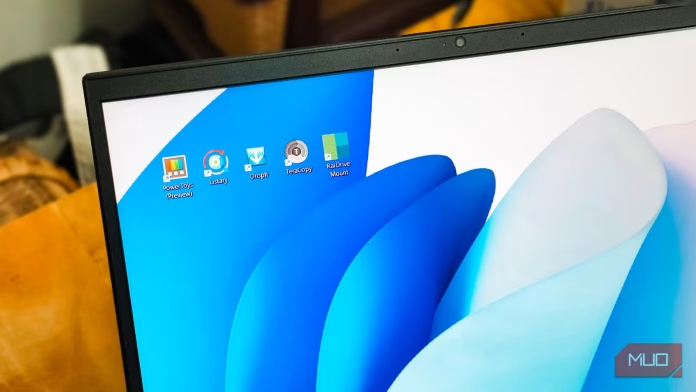
Listary improves file search
A faster search that works inside File Explorer
Between file transfers, searches, and renaming, I use File Explorer dozens of times every day. The Win + E shortcut makes it quick to open, but what’s not quick is the search. Windows Search relies on its own index, which skips folders outside the default indexed locations and takes forever to return results on drives with lots of files.
Listary fixed Windows search for me, and it’s without doubt the best File Explorer add-on I’ve tried in years. While Listary is a standalone app launcher and file search utility, its integration with File Explorer is what makes it an easy recommendation. You don’t need to open a separate window to make a search, but simple open any drive or folder and just start typing. Listary’s quick search bar appears and shows matching files from across all your drives, not just the folder you’re in.
The same thing works inside the Save and Open dialogs. Instead of navigating folder by folder to find the right place to save a file, I type a few letters of the folder name, and Listary jumps to it. [Listary reads the NTFS Master File Table directly], which is why it feels instant compared to Windows Search.
OS
Windows
Price model
Free, Premium
Listary is a Windows utility that instantly finds files, folders, and apps with smart, fuzzy search while boosting productivity across File Explorer and dialogs. It’s fast, intuitive, and deeply integrated.
Faster file transfer with TeraCopy
A reliable replacement for the default copy handler
Screenshot by Pankil Shah — No attribution required
Slow search isn’t the only issue with File Explorer. File transfers are another one. It works fine for basic operations, but the moment I try to move a large folder with mixed file types, it slows to a crawl. Windows does have a pause button now, but the pause isn’t immediate, and if the system crashes or restarts mid-transfer, you can’t resume from where you left off.
TeraCopy replaces the default copy handler with a robust option. It’s faster than File Explorer, shows accurate speed and time estimates, and doesn’t freeze when it hits a locked or problematic file. It skips and retries instead of stalling the whole transfer. Additionally, TeraCopy generates checksums while copying and verifies every file after, which is useful if you are moving video projects or backups to an external drive.
TeraCopy replaces Windows’ default file copy dialog with a faster, more reliable tool that pauses, resumes, verifies transfers, skips problem files, and handles large batches without crashing mid-copy.
You may already use PowerToys for a few features, but most people only touch a fraction of what it offers. One of its most underrated sections is File Explorer add-ons, tucked under File Management in PowerToys settings.
Open it, and you’ll find a Preview Pane panel where you can choose which file types show up in File Explorer’s preview pane (toggle it with Alt + P). You can enable previews for Scalable Vector Graphics, Source code files, Markdown, PDF, Geometric Code, and a few others. Markdown support is essential for me since I write in Markdown constantly for Obsidian and article drafts. Being able to preview a .md file inside File Explorer without opening a separate app saves me a surprising amount of time.
Right below that is the Thumbnail icon Preview section, which does the same thing for thumbnails instead of the preview pane. SVG files, PDFs, and STL models now show actual thumbnails in folder views instead of generic icons. It sounds minor, but when you’re scanning a folder full of design assets or 3D prints, having real thumbnails makes the process a lot more efficient.
OS
Windows
Developer
Microsoft Corporation
Microsoft PowerToys is a set of free Microsoft Windows utilities for power users to tune and streamline their Windows experience for greater productivity.
The core concept is associations. Each association combines a filter (by name pattern, extension, size, or date) with an action (move, copy, rename, compress, delete, and a few others). Once you set these up, DropIt can either watch a folder like Downloads and sort new files automatically, or you can drag files onto its floating icon to process them on demand.
The learning curve isn’t zero, as getting comfortable with associations takes some time. But DropIt supports wildcards and regular expressions, which means you can build genuinely smart rules, like grouping all Invoice_* files into a billing folder or routing RAW photos by date. I’ve written about how DropIt automatically organizes everything I download, and once the rules are in place, I rarely think about file organization again.
OS
Windows
Developer
Lupo PenSuite Team
DropIt is a lightweight Windows utility that automatically organizes files using rules, moving, renaming, compressing, or extracting content based on file type, name, or folder triggers to save time daily.
Mount any cloud storage to File Explorer with RaiDrive Mount
Access Google Drive, Dropbox, and more like local disks
Windows only lets you mount OneDrive natively to File Explorer as a local drive. If you use anything other than OneDrive, or if you manage multiple cloud accounts as I do, you need a third-party tool. RaiDrive is the one I settled on after trying a few.
RaiDrive mounts your cloud storage as virtual drives with their own drive letters. Google Drive, Dropbox, pCloud, WebDAV, FTP, S3, they all show up in File Explorer like regular disks with full read and write access. The free tier lets you connect up to eight drives, which is far more generous than the alternatives I tested. Setup is simple, where you need to pick the service, sign in, and assign a drive letter to get started.
The one quirk is that RaiDrive requires you to create and sign into a RaiDrive account before you can use it. It’s the only cloud mounter I know of with mandatory signup. It’s also optimized for sequential reads, which is why it works well for streaming 4K video straight from Google Drive without stuttering. Paid plans start at around $1.84/month and add encryption options, but the free version has been enough for my use.
OS
Windows, Linux
Price
Free, Premium
RaiDrive mounts cloud storage like Google Drive, OneDrive, Dropbox, and SharePoint as local drives in File Explorer, letting you browse and manage remote files without syncing or opening a browser.
File Explorer is fine, with the right help
File Explorer isn’t a bad file manager; it’s just incomplete, and all these tools add little to make it a very usable file manager. You don’t need all five, of course. Start with whichever gap annoys you the most. For me, it was a search, so Listary came first. For you, it might be cloud storage or slow copy speeds. The point is that File Explorer is flexible enough to be fixed from the outside, which is why I keep coming back to it instead of chasing the next alternative.





 Over the opening logos for Warner Bros., Legendary, and more, there are drums. They beat louder. Faster. A siren sounds, and a bunch of rectangular-shaped ships are shot into space. They make their way through the atmosphere of an unknown planet, and it’s brutal. Lightning strikes all around as they enter the atmosphere and plunge towards the surface. A few actually get destroyed by the weather as they continue to drop and approach the planet’s surface.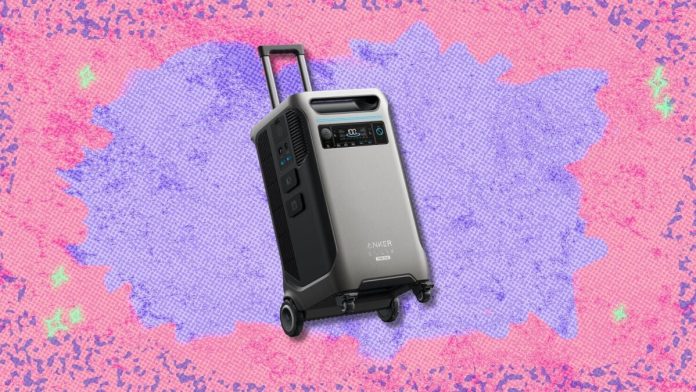

:contrast(8):quality(75)/https://static4.libertatea.ro/wp-content/uploads/2026/04/bolojan-dumitru-angelescu-1024x682.jpg)