It doesn’t matter if it’s for work, business, or pleasure; I have way too many unnecessary emails clogging up my inbox. I’ve had the same email address for over a decade, and one of my biggest faults is forgetting to unsubscribe from newsletters and companies I may once have been enamored with. In an increasingly busy digital world, the last thing I want to do is sift through roughly 20,000 unread emails that I may or may not need in the future. Plus, I don’t feel like getting scammed by someone in my emails, either.
After discovering Inbox Zero, an open-source AI assistant intended to clean up my inbox and get it back to basics, I was a little skeptical. But once I researched it further and discovered what it was capable of, I decided to give it a spin. A squeaky-clean inbox and no worry of my data being stolen. I’m over the moon with it.
5 useful things I do with a local LLM on my phone
Privacy aside, a local LLM is just really convenient.
Privacy first, and self-hosting options
The code is available for audit, and SOC 2 Type 2 certification keeps me feeling good

The first thing I want to mention about Inbox Zero is that, while open source, there may be a subscription cost. While tools like CleanFox are completely free, they offset the cost of cleaning up your inbox by scanning your emails and selling data to help build market research reports. I’m not about that, and if you don’t have the hardware to self-host your own Inbox Zero instance, you could be looking at roughly $20 a month for an AI assistant to clean out your emails.
However, for those who have the hardware and capabilities, Inbox Zero offers the option to self-host at no cost. Seeing as I have a Mini-PC on my desk that I’m using to host game servers, I may as well include the option to zip through my emails and clean them up, too. Seeing as the code for Inbox Zero is also open source, it’s meticulously audited to ensure there is nothing “phoning home,” and the cloud version is SOC 2 Type 2 certified, meaning it’s passed independent audits for managing data securely. There is also automatic PII detection, so you don’t need to worry about things like passwords being displayed in plain text. If you self-host, you’re the captain. Plus, they promise this AI won’t be scraping your info to train newer models, which is a plus.
Great at catching “cold” emails
I wish my phone knew how to block “Cold” calls as well as this does

One thing that genuinely impressed me is how well Inbox Zero does at catching a “cold” email, rather than something that has specifically been sent to you. I was worried at first that it would catch emails from friends and family that I don’t speak to as regularly as I likely should, and start automatically archiving them. Instead, it scans the language in an email and catches sales pitches, advertisements, and outreaches that don’t apply to my daily life, helping me filter them out.
Spam filters work well, but they don’t always catch the bad actors that are trying to get into my inbox. And seeing as I had well over 20,000 emails just sitting there, it did a great job of scanning through those, finding the “cold” openings and the sales lingo, and figuring out where they needed to go from there. Many places are using AI to draft emails, and it does a surprisingly good job of catching them in the act and disposing of them when it deems necessary. Plus, you can always adjust how Inbox Zero works, and you’ll be set if something ends up in the wrong folders. Just set a “Cold Outreach” folder, and you can scan from there.
Data Dashboard for personal reflection
I can see how many emails I got, how many I read, and what I replied to
I get a lot of emails in a day, and there are plenty that I, admittedly, completely forget to open or reply to. Using Inbox Zero, I can access a comprehensive Data Dashboard in the web client that shows how many emails I’ve received, which I’ve opened, and which I’ve ignored for too long. It’s a great way to keep myself accountable, and shows me who I really should be replying to more often.
It’s also surprisingly in-depth, giving me the option to check between last week, last month, last three months, and last year. This gives a ton of additional insight into how I use my email and what I could be doing better. As I work on getting my emails cleaned up, it’s also a great chance for me to reflect and see what types of deals I may have missed, or if an email came flying into my inbox in the early morning that I absolutely shouldn’t have missed. Bulk Unsubscribe and Bulk Archive options are also available, so I can clean up everything that I no longer need.
Self-Hosting is complicated
Prepare to spend some time to save some money
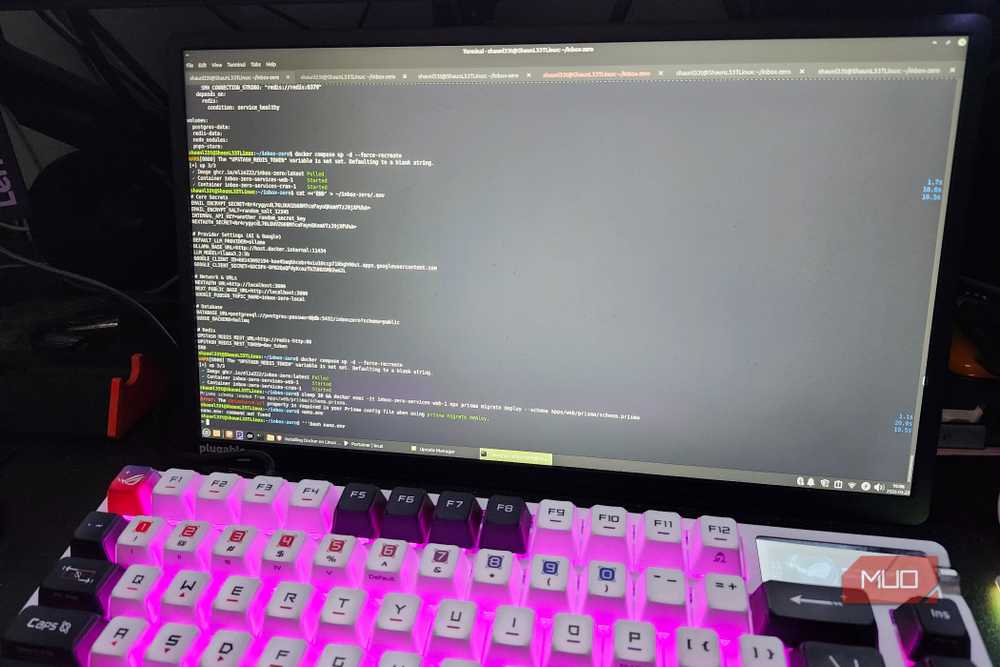
Many folks on MUO love self-hosting their own instances of things. Seeing as I’m incredibly new to the concepts of self-hosting, Docker, and related things, setting this up felt like a nightmare rather than a dream. But, after many hours of experimenting, finding what I needed to change in a Linux Mint installation and getting accustomed to how the terminal worked, I finally have my own self-hosted variant of Inbox Zero up and running. Granted, a local LLM on a mini-PC running an Intel HD 530 is going to be slower compared to an OpenAI API key, but to save some additional cash each month? I can be a little forgiving.
Why? Because I can run a local LLM like Ollama running a smaller Llama 3 8B model, alongside a Docker container with Inbox Zero snuggled up inside to save myself $20 a month. To be fair, in the time it took me to set everything up properly on the same mini-PC I host my RUST servers on, I could have likely cleared out my email. But seeing as I want to clean it up and keep it consistent? This was a fantastic, frustrating, and honestly fun little experiment. I learned a lot about Linux, and I’m hoping I never have to see a terminal window again. But I already know I’ll be back.

- OS
-
Windows / Linux / macOS
- Developer
-
elie222
- Individual Pricing
-
Free 7-Day Trail / Free Open-Source Hosting / Plans starting at $20 per month
- Free Trial
-
Yes
Inbox Zero has helped a ton already, and can only get better from here
Inbox Zero has been surprisingly helpful, and it shows me that I really need to start checking my email a bit more often. After going through the hassle of setting up my own self-hosted instance of it, I’ll happily let this little robot clean out my clutter. Plus, knowing that I’m in control of the privacy and the data that it sees? It helps me sleep a little better at night.

